
Wormhole Bookmarks
To get started make sure you are connect to our BM folder “xxx” and ensure it is online.
Save all bookmarks in the correct subfolder.
Set the expiration date appropriately (24 hours in most cases).
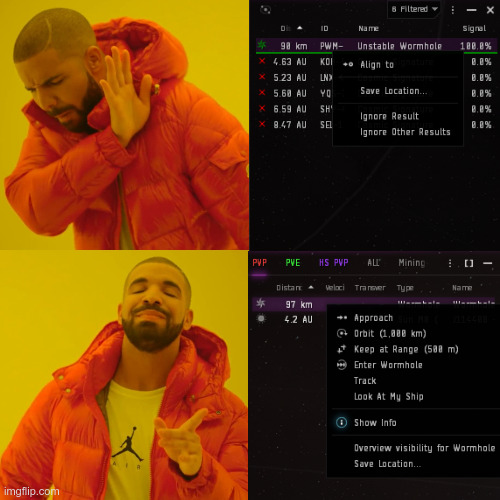
Bookmarks created from the Probe Scanner can be offset from the actual wormhole location. This may cause pilots to land outside jump range, potentially resulting in ship losses.
Wormhole bookmarks must always be created from your Overview while on-grid with the wormhole.
All non-wormhole signatures (combat sites, relic sites, data sites, gas sites, etc.) may be bookmarked directly from the Probe Scanner window.
Naming Rules
The naming system is designed to show:
- Where you currently are in the chain.
- What type of connection the bookmark represents.
- Which bookmark leads back toward home.
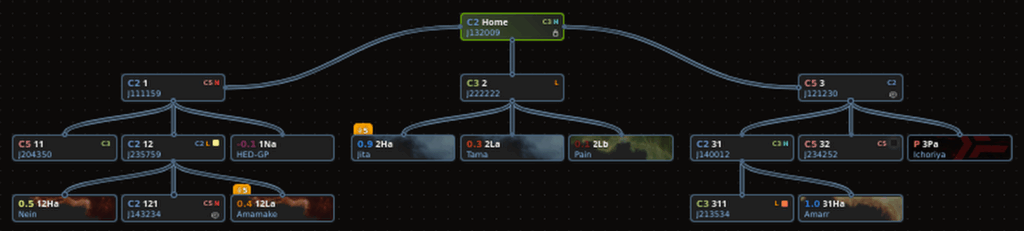
- The name is the route. If you call for help in the 232Na, your corpmates will be able to get to you without even looking at Wanderer.
(J-Space = Wormhole Space)
Every wormhole leading to another wormhole system receives a numerical designation.
Home System
Connections scanned directly from home are numbered sequentially:
1
2
3
Systems Further Down the Chain
When scanning from a system that is not home, the system’s designation is added as a prefix.
Example:
21 = First J-Space Connection found in the system 2.
11 = First J-Space connection found in system 1.
12 = Second J-Space connection found in system 1.
Another example:
231 = First J-Space connection found in system 23.
232 = Second J-Space connection found in system 23.
233 = Third J-Space connection found in system 23.
The final number indicates the order in which J-Space connections were discovered in that system. This helps us distinguish the connections more easily.
- K-Space Connections
(K-Space = Known Space)
Connections to known space receive a letter based on the destination type.
| Code | Destination |
|---|---|
| H | Highsec |
| L | Lowsec |
| N | Nullsec |
| P | Pochven |
| T | Thera |
we always add a suffix letter:
Ha, Hb, Hc
Na, Nb, Nc
La, Lb, Lc
Examples
From Home:
Ha = First Highsec connection
Hb = Second Highsec connection
Na = First Nullsec connection
From System 23:
23Ha = First Highsec connection found in system 23
23Hb = Second Highsec connection found in system 23
23Na = First Nullsec connection found in system 23
Rule: The system designation comes first, followed by the destination type.
- Return-to-Home Bookmarks
Any bookmark leading back toward our home system must be prefixed with:
“++”
Examples:
++2
++23
++23Ha
Important Rule
Following the “++” chain will always lead you back home.
Whenever you are unsure how to return, simply follow the next available “++” bookmark.
- Example: Returning Home
Assume you are currently in “23Ha”.
- Warp to “++23Ha” and jump through.
- You arrive in “23”.
- Warp to “++23” and jump through.
- You arrive in “2”.
- Warp to “++2” and jump through.
- You arrive back in the home system.
Chain:
23Ha → ++23Ha → 23 → ++23 → 2 → ++2 → Home
If every bookmark is named correctly, following the “++” route will always bring you home.
Written by Vargoh